Choosing the right indoor golf simulator with launch monitor can turn a spare room, garage, or basement into a realistic practice bay. The best setups balance accuracy, software compatibility, space requirements, and ease of use.
Below, we focus on options that fit different budgets and player goals, from portable launch monitors to premium all-in-one simulator bundles.
Best 10 Indoor Golf Simulator with Launch Monitor Picks for 2026
Portable Radar Pick
Garmin Approach R10 Portable Launch Monitor

- Portable for indoor use or the range
- Pairs with Garmin Golf app for key metrics
- Includes tripod, phone mount, and case
Best For: Portable practice and app-based home simulation
Camera-First Sim Pick
Uneekor EYE MINI CORE Launch Monitor

- Near-zero latency camera and IR tracking
- Works with GSPro, E6, TGC19, and more
- No ball stickers needed for tracking
Best For: Dedicated simulator rooms with software compatibility
Tour-Accuracy Value
Bushnell Launch Pro i Circle B Edition
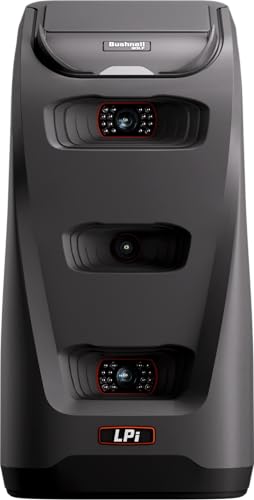
- Three-camera infrared system for accuracy
- Indoor simulator-focused design
- Subscription unlocks ball and club data
Best For: Indoor setups that want accuracy with modular software
Premium Touchscreen Choice
Garmin Approach R50 Launch Monitor

- Built-in 10-inch touchscreen display
- 3 cameras with 15-plus metrics
- HDMI output and 43K-plus course support
Best For: Premium all-in-one indoor simulator setups
Complete Home Studio Pick
SkyTrak ST MAX Complete Home Simulator

- All-in-one package with monitor, enclosure, mat, screen, and projector
- Dual Doppler radar plus photometric camera system for detailed data
- Includes GOLFTEC speed training tools and a 14-day trial
Best For: A full home studio build in a garage, basement, or spare room
Portable Simulator Pick
FlightScope Mevo Gen2 Portable Launch Monitor

- Portable launch monitor with 3D Doppler tracking and image processing
- Tracks 18 data parameters for full swing, chipping, and putting
- Includes 8 E6 Connect courses and no subscription fees
Best For: Golfers who want a portable indoor/outdoor setup with simulator features
App-Driven Training Pick
Rapsodo MLM2PRO Launch Monitor

- Dual camera and Doppler radar for shot tracking and swing capture
- 15 metrics including spin rate, carry distance, club speed, and path
- 45-day premium trial adds simulation, range tools, and speed training
Best For: Golfers who want a compact, app-based launch monitor for practice and simulation
Tour-Grade Portable Pick
SkyTrak ST+ Plus Golf Launch Monitor & Simulator Bundle

- Dual Doppler radar and photometric camera
- Tracks ball and club data indoors or outdoors
- Includes software access and 14-day trial
Best For: Golfers wanting portable, detailed launch data with simulation-ready features
iPhone-Friendly Budget Pick
Rapsodo Mobile Launch Monitor Golf Simulator

- iPhone and iPad only with Bluetooth connectivity
- Tracks shot distance, ball speed, club speed, and launch angle
- Adds GPS satellite view, tracers, and video playback
Best For: iOS golfers who want a compact, portable training and tracking tool
Feature-Rich Analyzer Pick
Rapsodo MLM2Pro Mobile Launch Monitor Golf Simulator

- Measures 13 core metrics including spin rate and spin axis
- Dual-camera system for detailed swing analysis
- Includes tripod, case, and 3 Chrome Tour balls
Best For: Golfers seeking advanced mobile data and simulator-style practice
Portable Radar Pick – Garmin Approach R10 Portable Launch Monitor
If you want an indoor golf simulator with launch monitor functionality that travels easily, the Garmin Approach R10 is a practical place to start. It is built for home use, indoor practice, and the driving range, while pairing with the Garmin Golf app to show core swing and ball-flight metrics in a simple setup.
Best For: Golfers who want a portable, app-connected launch monitor for home practice and range sessions.
Pros:
- Tracks club head speed, ball speed, swing tempo, spin, launch angle, and more when paired with the Garmin Golf app.
- Supports training mode with club-by-club stats and shot dispersion charts.
- Can record swing video clips with metrics attached for easier review.
- Includes a tripod, phone mount, and carry case, plus up to 10 hours of battery life.
Cons:
- Requires a compatible smartphone and the Garmin Golf app for full functionality.
- Virtual rounds and some features require an active subscription.
The R10 is best viewed as a flexible, portable launch monitor rather than a full built-in simulator. For golfers who value convenience, app integration, and useful practice feedback, it offers a balanced feature set without demanding a permanent indoor setup.
Camera-First Sim Pick – Uneekor EYE MINI CORE Launch Monitor
The Uneekor EYE MINI CORE is a strong choice if you want an indoor golf simulator with launch monitor performance centered on camera-based tracking. Its high-speed cameras and infrared sensors are designed for near-zero latency, and the unit works with popular simulator software for a more immersive home setup.
Best For: Golfers building a serious simulator room who want camera-based tracking and software flexibility.
Pros:
- Uses high-speed cameras and infrared sensors for real-time tracking and near-zero latency.
- Reads any dimple pattern, so no ball stickers are needed for ball tracking.
- Includes VIEW software with 15 ball data points and session reports.
- Compatible with GSPro, E6 Connect, TGC19, and Creative Golf 3D.
Cons:
- Some features require additional software, subscriptions, or upgrades.
- PC requirements are fairly demanding for simulation use.
This model leans heavily into simulation quality and detailed feedback rather than portability. If your priority is a dedicated indoor setup with broad software support and camera precision, it stands out as a serious home-simulator option.
Tour-Accuracy Value – Bushnell Launch Pro i Circle B Edition
The Bushnell Golf Launch Pro i Circle B Edition is aimed squarely at indoor simulator use, making it a relevant indoor golf simulator with launch monitor option for golfers who want camera-based accuracy. Its three-camera imaging system is built to deliver tour-level measurement without relying on radar algorithms, and the unit comes ready to start setup right away.
Best For: Indoor golfers who want accurate ball and club data with a pay-as-you-go simulator path.
Pros:
- Three-camera infrared system is designed for tour-level accuracy.
- Provides ball and club data including carry distance, launch, spin, and club head speed with subscription.
- Designed specifically for indoor simulator use.
- Includes USB-C cable, Ethernet cable, alignment stick, power cord, club markers, and a 14-day Gold trial.
Cons:
- Ball and club data require an active software subscription.
- Optional FSX software packages are needed for expanded gameplay and analytics.
This is a good fit if you want strong accuracy and a lower-friction path into indoor simulation. It is especially appealing for buyers who prefer to add software as needed rather than bundle everything upfront.
Premium Touchscreen Choice – Garmin Approach R50 Launch Monitor
The Garmin Approach R50 is the most feature-rich option here for anyone wanting an indoor golf simulator with launch monitor capabilities in one unit. With a built-in touchscreen, three high-speed cameras, and HDMI output for larger displays, it is built to handle practice, simulation, and feedback from one premium device.
Best For: Golfers who want an all-in-one premium launch monitor and simulator with a built-in screen.
Pros:
- 3-camera system provides 15-plus metrics, including spin and axis.
- Built-in 10-inch touchscreen lets you review impact videos and select courses on the device.
- Supports virtual rounds on more than 43,000 courses through Home Tee Hero with a Garmin Golf membership.
- Includes a carrying case and up to 4 hours of battery life for range use.
Cons:
- Virtual rounds and some features require a subscription.
- Battery life is shorter than some portable monitors at up to 4 hours.
For buyers who want the least compromise and the most integrated experience, the R50 is the clear premium play. It is especially appealing if you want to see data, impact video, and simulation content directly on the device before sending it to a monitor or projector.
Complete Home Studio Pick – SkyTrak ST MAX Complete Home Simulator
If you want an indoor golf simulator with launch monitor technology that feels truly complete, this SkyTrak ST MAX package is built to get you playing quickly. It bundles the launch monitor, enclosure, impact screen, steel frame, hitting mat, projector, and trial software, so you can focus on setup and practice rather than sourcing separate parts.
Best For: Golfers who want an all-in-one home simulator studio for a home, garage, or basement setup.
Pros:
- Includes the launch monitor, enclosure, screen, steel frame, mat, and short-throw projector in one package
- Dual Doppler radar and photometric camera system provide high-precision ball and club data
- Speed training tools powered by GOLFTEC add practice and improvement features
- Comes with a 14-day trial for simulator play and game-improvement tools
Cons:
- Requires measuring your room carefully before buying because size and ceiling clearance matter
- Studio 13 Deep needs substantially more space than the smaller studio options
For buyers who want a ready-to-build indoor golf simulator with launch monitor data and a full visual setup, this package is the most turnkey option in the group. The main tradeoff is space planning, but if your room fits, it offers a straightforward path to a serious home simulator.
Portable Simulator Pick – FlightScope Mevo Gen2 Portable Launch Monitor
The FlightScope Mevo Gen2 is a strong choice if you want an indoor golf simulator with launch monitor functionality that also works well on the range. Its portable design, 3D Doppler tracking, and synchronized image processing make it practical for golfers who want accurate feedback without committing to a fixed studio setup.
Best For: Golfers who want a portable launch monitor they can use indoors, outdoors, and at the driving range.
Pros:
- Uses FlightScope Fusion Tracking with 3D Doppler radar and high-speed image processing
- Captures 18 full swing, chipping, and putting data parameters
- Includes 8 E6 Connect courses plus GPS overview and Shot Tracer
- No subscriptions, hidden fees, or annual license fees
Cons:
- Works through mobile apps and connected devices rather than a built-in simulator enclosure
- Battery life is listed at up to 6 hours, so longer sessions may require charging planning
For golfers who value portability and a broad data set, the Mevo Gen2 offers a flexible path into simulator golf. It is especially appealing if you want one device for indoor practice, outdoor sessions, and range work without ongoing license costs.
App-Driven Training Pick – Rapsodo MLM2PRO Launch Monitor
The Rapsodo MLM2PRO is a practical indoor golf simulator with launch monitor features for golfers who want shot data and swing feedback in a compact, mobile format. With Doppler radar, dual cameras, and a premium trial that unlocks simulation and training tools, it is a good fit for home practice spaces and range sessions alike.
Best For: Golfers who want a compact launch monitor with strong app-based training and simulator options.
Pros:
- Doppler radar and dual camera setup support reliable shot tracking and swing capture
- Measures 15 key metrics including spin rate, spin axis, carry distance, club speed, and club path
- 45-day premium trial unlocks simulated courses, target range, impact vision, and speed training
- Includes 3 ProV1 balls, a tripod, carrying case, and charging cable
Cons:
- Premium simulator and course features depend on the trial and related app access
- Designed as a mobile launch monitor, so it does not include a full enclosure or projector setup
If you want a flexible launch monitor that doubles as a training aid, the MLM2PRO offers a lot in a small package. Its combination of metrics, video capture, and premium simulator access makes it especially appealing for golfers focused on practice and feedback.
Tour-Grade Portable Pick – SkyTrak ST+ Plus Golf Launch Monitor & Simulator Bundle
If you want an indoor golf simulator with launch monitor tech that also works outdoors, the SkyTrak ST+ Plus is built for serious feedback and flexible practice. Its dual Doppler radar and photometric camera are designed to capture both ball and club data, while the compact 2″ x 2″ hitting zone keeps the setup manageable in tighter spaces.
Best For: Golfers who want a portable, simulation-ready launch monitor with detailed shot and club data.
Pros:
- Dual Doppler radar plus photometric camera for indoor and outdoor use
- Tracks carry distance, ball speed, spin, launch angle, shot shape, club path, and face angle
- Compact and lightweight with a small hitting zone for easier setup
- Includes a 14-day trial membership, software access, and driving range features
Cons:
- The 2″ x 2″ hitting zone may feel restrictive for some users
- Best suited to golfers who want to use software and memberships to unlock the full experience
Overall, the ST+ Plus is a strong fit if you want detailed swing feedback and simulation features in one portable package. It balances practice utility with home-course play and gives you the data depth needed for structured improvement.
IPhone-Friendly Budget Pick – Rapsodo Mobile Launch Monitor Golf Simulator
The Rapsodo MLM is a practical indoor golf simulator with launch monitor functionality for golfers who already use an iPhone or iPad. It combines GPS satellite view, shot tracking, and swing video playback to create a simple setup that emphasizes immediate feedback and easy portability.
Best For: iPhone and iPad users who want a compact, easy-to-carry swing analyzer with GPS tracking.
Pros:
- Works with iPhone and iPad for a simple mobile setup
- Provides ball speed, club speed, launch angle, and shot distance data
- Includes GPS satellite view, shot tracers, and shot scatter mapping
- Video playback helps you review and compare swings
Cons:
- Compatible with iOS only
- Less data depth than newer multi-metric launch monitors
For golfers who want an accessible simulator-style training tool without a full enclosure setup, the MLM keeps things straightforward. It is best viewed as a portable feedback device that focuses on core numbers, shot visualization, and fast practice sessions.
Feature-Rich Analyzer Pick – Rapsodo MLM2Pro Mobile Launch Monitor Golf Simulator
If you are shopping for an indoor golf simulator with launch monitor capabilities and more advanced ball data, the Rapsodo MLM2PRO stands out for its deeper metric set. With dual cameras and support for virtual course play, it is aimed at golfers who want a realistic home practice experience plus detailed swing analysis.
Best For: Golfers who want a more advanced mobile launch monitor with spin data and simulator integration.
Pros:
- Measures 13 core metrics, including spin rate, spin axis, and swing speed
- Dual-camera design supports detailed golf swing analysis
- Works with smartphone or tablet to create a home golf simulator setup
- Includes 3 Callaway RPT Chrome Soft X balls, tripod, case, and charging cable
Cons:
- Still depends on a compatible mobile device for the full experience
- More feature-rich than basic monitors, so casual users may not need every metric
The MLM2PRO is a strong choice when you want a launch monitor that goes beyond basics and into more advanced performance detail. It gives you a path to simulator-style practice at home or on the range while still staying portable.
How We Picked the Best Indoor Golf Simulator with Launch Monitor
We prioritized launch monitor accuracy, indoor performance, simulator software support, setup simplicity, and overall value. We also looked for systems that serve different users, including players who want a portable practice tool and buyers who want a complete home bay.
Quick Comparison
Portable models are best if you want flexible use at the range and inside the home. Premium camera-based units usually deliver more detailed data and stronger indoor consistency. Simulator bundles cost more, but they reduce guesswork by including key room components in one purchase.
Key Buying Factors for an Indoor Golf Simulator with Launch Monitor
Accuracy and Data Needs
Decide whether you need basic ball flight numbers or deeper club and ball metrics. Better data matters if you want to work on dispersion, launch conditions, and gapping.
Indoor Space and Setup
Measure ceiling height, room depth, and hitting area before buying. Some systems need more ball flight, while others are built to work in tighter indoor spaces.
Software and Course Play
Check simulator platform compatibility if virtual courses matter to you. Some users want simple practice tools, while others want a full golf simulator experience with realistic course play and training modes.
Portability Versus Permanence
Portable launch monitors are ideal for golfers who split time between indoor practice and the driving range. Full bundles suit buyers who want a dedicated year-round setup and fewer add-on purchases.
Budget and Expansion
Think beyond the launch monitor itself. Enclosures, mats, screens, subscription fees, and hitting space can affect total cost more than the device alone.
Who Should Buy Which Indoor Golf Simulator with Launch Monitor?
If you want a simple practice setup, choose a portable monitor. If you want high-end indoor performance and richer data, step up to a camera-based unit. If you want the easiest path to a complete home bay, a bundled simulator package is the smartest choice.
For most buyers, the best Indoor Golf Simulator with Launch Monitor is the one that matches your room, your data goals, and how often you plan to practice.